Cora CLI: The BYOK AI Code Review Tool That Runs Anywhere — Terminal, CI, or Pre-Commit Hook
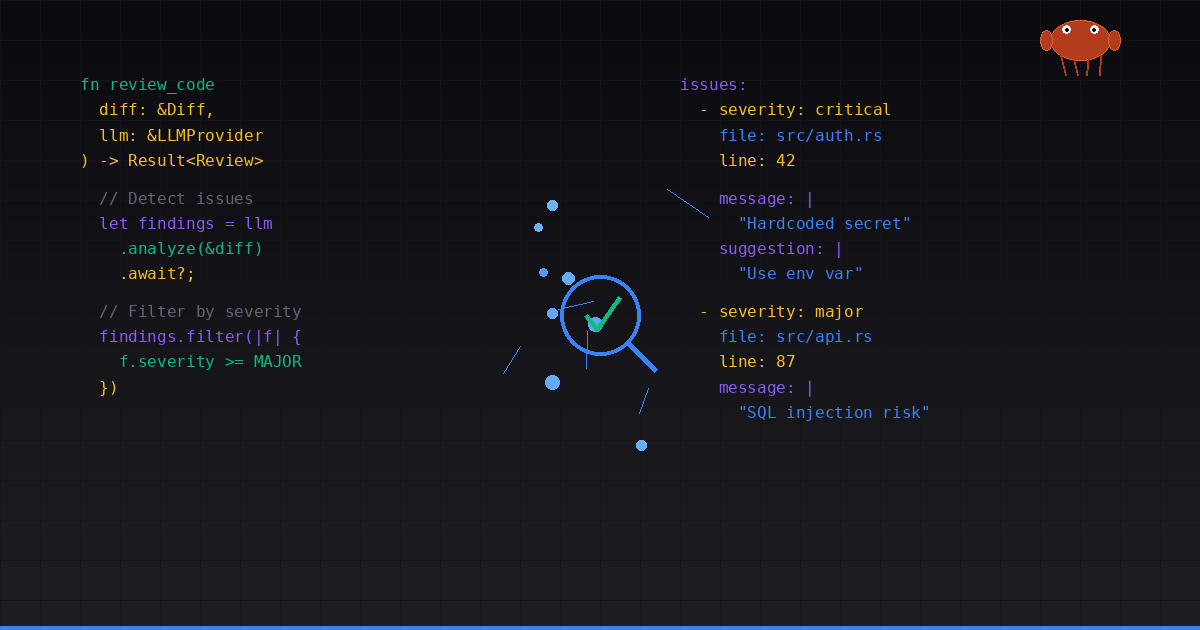
Code review is one of those things every team knows they should do more of, but in practice it often becomes a bottleneck. Pull requests sit waiting for senior engineers, CI pipelines flag nothing meaningful, and the occasional critical bug slips through because nobody caught the logic error hiding inside a 400-line diff.
Enter Cora — a Rust-based CLI tool that plugs any LLM you already pay for into your code review workflow. No new subscription. No IDE plugin. Just a binary that understands your git diff and tells you what's wrong.
What Is Cora CLI?
Cora is an open-source AI code review tool built in Rust (v0.6.1 as of June 2026). You point it at your staged changes, a branch diff, or a pull request, and it sends the context to an LLM of your choice — OpenAI, Anthropic, Google, Ollama, or any OpenAI-compatible endpoint. The LLM analyzes the code and returns structured findings with severity levels, file locations, and actionable suggestions.
The key differentiator is what Cora doesn't force on you: there's no vendor lock-in, no per-seat pricing, and no requirement to run inside a specific editor. It works in your terminal, in GitHub Actions, in GitLab CI, as a git pre-commit hook, and as an MCP server inside AI coding agents like Claude Code, Cursor, or Copilot.
How Does It Work?
Cora follows a multi-stage pipeline designed to catch issues that both linters and LLMs miss on their own:
1. Diff Collection — It reads your git diff (staged files, unpushed commits, or a branch comparison) and parses it into structured hunks with language detection for 70+ file extensions.
2. Deterministic Rule Engine — Before hitting any LLM, a regex-based rule engine scans for common issues: hardcoded secrets, disabled TLS, debug prints left in production, unwrap() calls, SQL injection patterns, and more. These findings are always reported regardless of LLM output. You can write custom rules in .cora.yaml with severity levels and file matching.
3. Static Security Scanner — A dedicated secrets pre-scan runs before the LLM review, catching hardcoded API keys, tokens, and credentials that shouldn't wait for a full review cycle.
4. Cross-File Context — Cora extracts imports, function calls, and type references from changed files and injects relevant context from unchanged files. This means the LLM knows what AuthMiddleware::verify() does even if you only changed the call site, not the implementation. Context injection supports 5 languages: Rust, Python, JS, Go, and Java.
5. LLM Analysis — The enriched diff is sent to your configured LLM with temperature locked at 0 by default. Same diff, same issues — every time. No random hallucinated findings that disappear on the next run.
6. Anti-Hallucination Filter — File paths are injected into the prompt and post-parse filtering removes any findings referencing files not in the actual diff. LLMs can't fabricate issues in files they haven't seen.
7. Structured Output — Results come back in your terminal with colorized severity levels, or as SARIF for GitHub Code Scanning, or as JSON for custom integrations. Exit codes are non-zero when critical issues are found, making Cora usable as a hard gate in CI.
Code Intelligence: Going Beyond Diffs
Starting from v0.6.0, Cora added a code intelligence layer that indexes your entire codebase, not just the diff. This is a significant architectural expansion — Cora is no longer just a review tool, it's becoming a code understanding platform.
Symbol Indexing — cora index builds a SQLite-based symbol index with FTS5 full-text search, supporting 13 languages: Rust, Python, TypeScript, JavaScript, Go, Java, C/C++, Ruby, PHP, Swift, Scala, Lua, and Zig. An optional --watch flag keeps the index synced as files change.
Symbol Search — cora explore lets you search across your indexed codebase using natural queries, finding symbols, types, and definitions without leaving the terminal.
Call Graph Analysis — cora callers traverses the reverse call graph to find every function that calls a given symbol. cora impact computes the blast radius — what breaks if you change this function?
Affected Test Selection — cora affected identifies which test files are impacted by your changes, enabling targeted test runs in CI instead of running the entire suite.
Smart Commit Workflow
One of the most practical additions is cora commit — a workflow that combines code review with conventional commit message generation and a quality gate. It reviews your staged changes, generates a conventional commit message (feat, fix, refactor, etc.), and asks you to confirm before committing.
In YOLO mode (cora commit --yolo), it auto-commits with zero prompts — useful for solo projects. The --force flag bypasses quality gate failures, and --no-review skips review entirely if you only want the commit message generation.
Tech Debt Tracking
Cora now tracks technical debt across your review history. cora debt generates reports showing recurring issues, severity trends, and estimated fix effort. This turns one-off review findings into actionable data about codebase health over time.
MCP Server for AI Coding Agents
Cora ships a built-in MCP (Model Context Protocol) server with 14 tools that integrate directly into AI coding agents. This means Claude Code, Cursor, Copilot, and Windsurf can use Cora's code intelligence without any wrapper scripts.
The MCP server exposes: symbol search, caller/impact analysis, affected test detection, diff review, debt metrics, project info, and memory recall. It runs via cora mcp and communicates over stdio — exactly how AI agents expect.
Uteke Bundle
Cora is part of the CodecoraDev ecosystem. A single bundle installer (install-bundle.sh) sets up both Cora and Uteke (the offline-first semantic memory engine) in one command. The two tools share memory — Cora saves review findings to Uteke, and Uteke provides recall context for future reviews. This creates a feedback loop where reviews get smarter over time.
Setting It Up
Installation is a single curl command:
curl -fsSL https://raw.githubusercontent.com/codecoradev/cora-cli/main/install.sh | shThen authenticate:
cora auth loginThis walks you through picking a provider (OpenAI, Anthropic, Groq, Ollama, Z.AI, or custom) and entering your API key. Credentials are stored in ~/.cora/auth.toml with 0600 permissions.
After that:
cora review          # review staged changes
cora commit          # review + generate commit message
cora index           # build codebase symbol index
cora explore         # search symbols
cora callers fn_name # who calls this function?
cora affected        # which tests are impacted?
GitHub Marketplace Action
Cora is now available on the GitHub Marketplace as a first-class action. No need to reference a specific repo — just add it to your workflow:
name: CI
on:
  pull_request:
    branches: [develop]
jobs:
  cora-review:
    runs-on: ubuntu-latest
    steps:
      - uses: actions/checkout@v4
        with:
          fetch-depth: 0
      - uses: codecoradev/cora-action@v1
        with:
          github-token: ${{ secrets.GITHUB_TOKEN }}
          cora-api-key: ${{ secrets.OPENAI_API_KEY }}
          severity: major
          upload-sarif: 'true'
The action handles installation, diff comparison, SARIF upload to GitHub Code Scanning, PR comment posting, and pipeline gating — all configurable via action inputs.
Pre-Commit Hooks
For instant feedback before pushing:
cora hook installEvery git commit automatically reviews staged files. If critical issues are found, the commit is blocked. You can bypass with --no-verify, but the default path catches problems before they reach CI.
Configuration
Everything is configurable through .cora.yaml in your project root. Provider and model, temperature, max tokens, focus areas (security, performance, bugs, best practices), custom regex rules, ignore patterns, bundling strategy, context chain settings — it's all there. The priority chain: CLI flags → env vars → project config → global config → defaults.
What Makes Cora Different?
vs. GitHub Copilot / Cursor — IDE-embedded tools tied to an editor and subscription. Cora runs headless in CI, terminals, and scripts. It's the tool for when you want review as part of your pipeline, not your editor.
vs. CodeRabbit / Qodo — SaaS platforms that cost per developer and send your code through their servers. Cora is a single binary, MIT-licensed, and your code stays on your infrastructure. The only external call is to your own LLM provider.
vs. Traditional Linters — clippy, ESLint, and ruff catch syntax errors and known anti-patterns but don't understand intent. Cora catches logical errors, security design flaws, and architectural issues that require semantic understanding.
Cora sits between linters and AI IDE tools: semantic understanding without requiring an IDE, running in environments where IDE plugins can't reach.
Who Is Cora For?
Cora is built for developers who want AI code review without the typical trade-offs. If you already have an LLM API key, Cora gives you a pipeline-grade review tool for zero additional cost. It's particularly useful for small teams without dedicated reviewers, open-source maintainers handling PR volume, and organizations that can't send proprietary code to SaaS platforms.
The project is actively developed (v0.6.1, June 2026), MIT-licensed, available on GitHub Releases, and on the GitHub Marketplace. The source is at codecoradev/cora-cli.
Between code review, commit message generation, tech debt tracking, symbol indexing, and MCP integration, Cora is shaping up to be a comprehensive code intelligence toolkit — not just a review tool.
Comments ()