Auto-Claude + GLM 4.7: The Future of Parallel Autonomous Development with Git Worktrees
My Discovery: When AI Tasks Work in Perfect Harmony
Not long ago, I stumbled upon Auto-Claude, an open-source autonomous coding agent that fundamentally changed how I think about AI-assisted development. The catalyst? When the GLM 4.7 model dropped, a friend decided to fork the project and create a version supporting this new model. I grabbed their fork, added some tweaks to fix compatibility issues, and took it for a spin.
And wow—I was blown away.
Here's what fascinated me most: imagine being able to assign multiple AI tasks to run simultaneously across your project—different features, different branches, different workflows—all without a single merge conflict. You're probably thinking: That's impossible, right? How could that even work?
Well, spoiler alert: it's not only possible—it's elegant. And it all comes down to Git Worktrees.
The Magic Behind the Curtain: Git Worktrees Explained
Before diving into Auto-Claude's architecture, let me explain the unsung hero that makes this whole thing possible: git worktree.
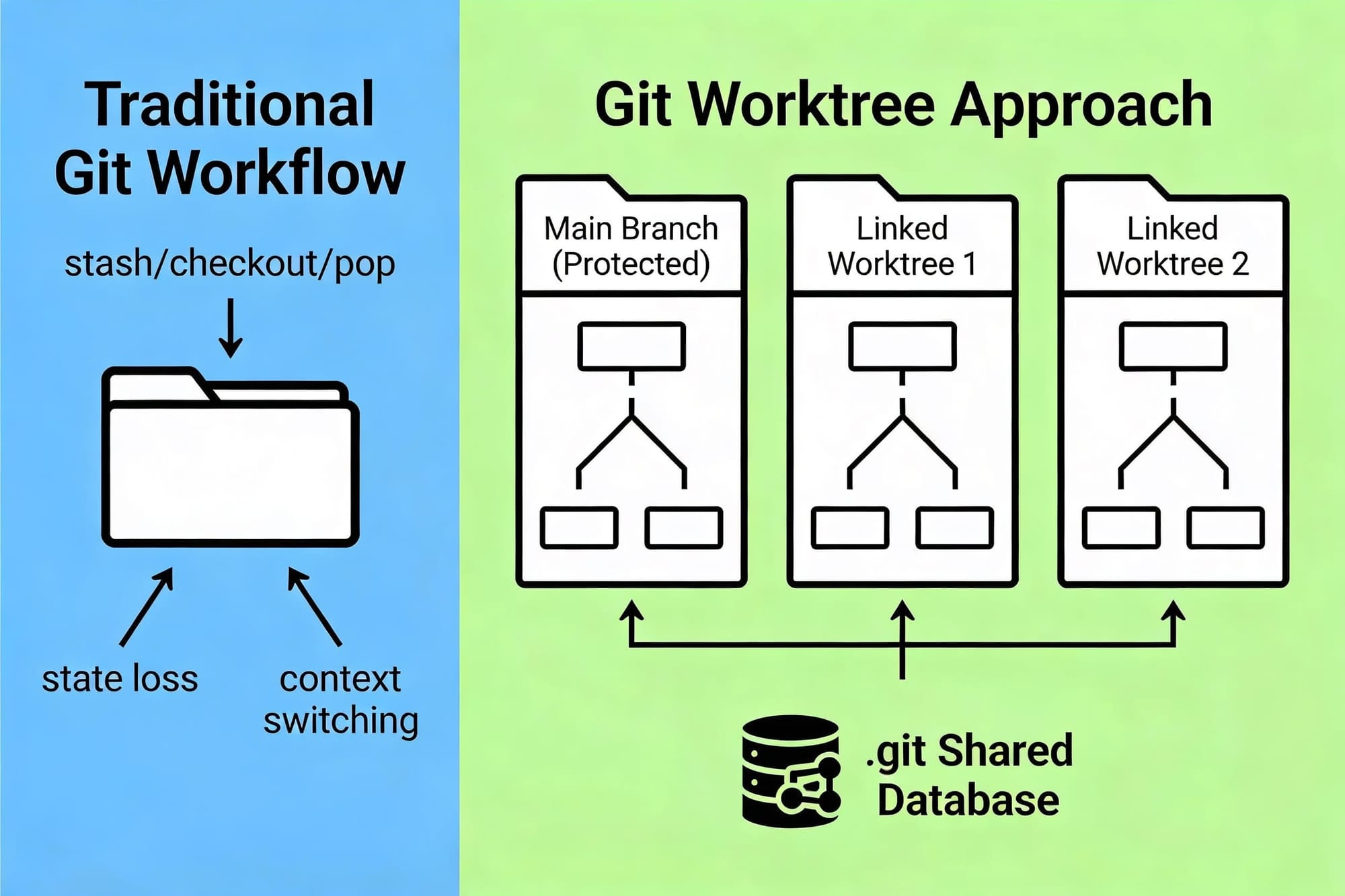
The Traditional Problem
For years, developers faced an awkward truth: Git forces you to choose between two bad options:
- Context Switching Hell: You're deep in feature development with 50+ commits. Suddenly, a critical bug needs fixing. You stash your work (
git stash), switch branches, fix the bug, switch back, and unstash. Clunky. Error-prone. And that uncommitted state? Gone. Hope you didn't have dependent processes running. - Multiple Terminal Nightmare: You open two terminals in the same directory, thinking you can work on different branches simultaneously. Then you run
git checkout feature-bin one terminal... and surprise—both terminals now see the new branch. That's because Git only allows one branch per directory.
Result: Developer productivity in the Stone Age.
The Git Worktree Solution
Git Worktree elegantly solves this with a deceptively simple idea: give each branch its own directory.
project-repo/
├── project--main/ # Primary Worktree (with full .git/)
│ ├── src/, tests/
│ └── .git/
├── feature-x/ # Linked Worktree 1
│ ├── src/, tests/
│ └── .git # Pointer to main .git
├── hotfix/ # Linked Worktree 2
│ ├── src/, tests/
│ └── .git # Pointer to main .git
└── testing/ # Linked Worktree 3
├── src/, tests/
└── .git # Pointer to main .git
Notice the structure? Each directory is independent. Switching between branches? Just cd ../hotfix instead of git checkout hotfix. No stashing. No state loss. No interference.
The Technical Magic
Here's what's clever about git worktrees:
- Main worktree contains the
.git/directory (the full Git database) - Linked worktrees contain a
.gitfile (just a pointer) that references the main repository - Shared Git database means all commits are visible across all worktrees instantly
- Independent working directories mean changes in one worktree don't affect others until committed
When you want to create a new worktree:
# Checkout existing branch in new worktree/hotfix hotfix
git worktree add ..# Create branch and worktree simultaneously/feature-auth
git worktree add -b feature-auth ..# List all active worktreesworktree list
git# Remove worktree when done/hotfix
git worktree remove ..
The result? True parallel development without the traditional Git dance.
Auto-Claude: Autonomous Coding at Scale
Now imagine combining this architecture with autonomous AI agents. That's Auto-Claude. Ofiical Github Link : https://github.com/AndyMik90/Auto-Claude
Demo Running using GLM 4.7
What Auto-Claude Does
Auto-Claude is an open-source desktop application that automates your entire development pipeline:
- Understands Your Codebase - AI analyzes your tech stack and existing patterns
- Creates Specifications - Converts your requirements into detailed specs
- Breaks Down Tasks - Splits work into manageable subtasks
- Implements Solutions - AI agents write code with automatic verification
- Self-Healing QA - Built-in validation loop that fixes issues before you see them
- Intelligent Merging - AI-powered conflict resolution that handles complex merges in seconds
The promised result: 10x productivity improvement while maintaining or even improving code quality.
Why Parallel Tasks Don't Conflict
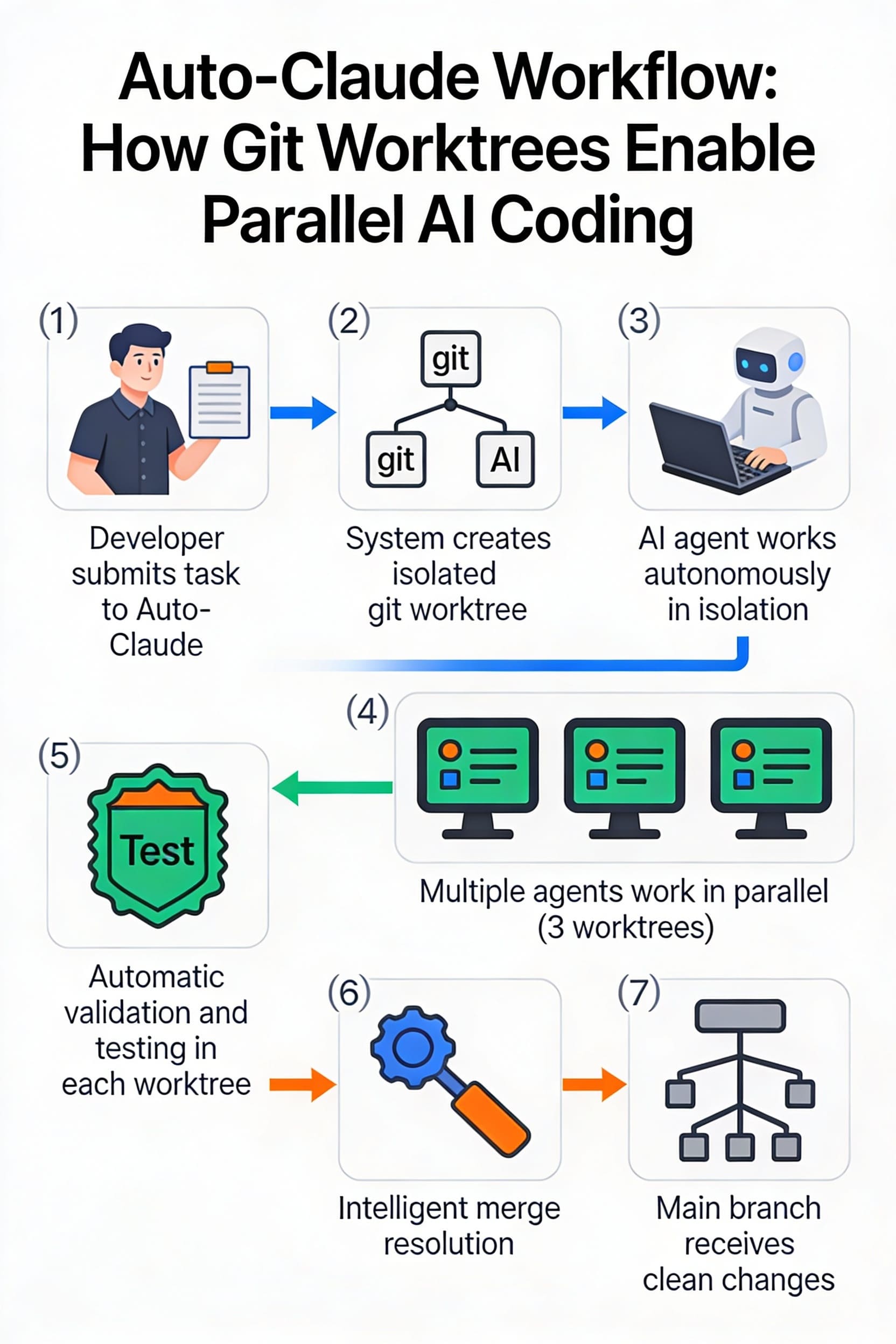
Here's the key insight: Auto-Claude creates a separate git worktree for every task.
Workflow:
- You give Auto-Claude a task
- It creates a new git worktree isolated from your main branch
- AI agent works autonomously in that isolated environment
- Multiple agents can run simultaneously across multiple worktrees
- Your main branch stays pristine and untouched
- When ready, intelligent merge resolution stages changes for your review
This is beautiful because:
- Safety by Design - Main branch is always protected. Worst case? Discard a branch that didn't work out. Main is fine.
- True Parallelism - Multiple AI agents working on different features simultaneously. No queue. No bottleneck.
- Natural Conflict Resolution - Since each task has its own branch, conflicts are isolated and managed intelligently
- Developer Confidence - You can trust autonomous AI when it's properly isolated
Think about it: the reason you might hesitate to let AI code autonomously is: "What if it breaks something?" Git worktrees solve this: it can't break your main branch.
Key Features That Make It Work
Parallel Agent Execution - Launch multiple AI agents. They work in parallel, each in their own worktree. Your machine can run builds simultaneously without blocking.
Context-Aware Engineering - Before writing code, agents analyze your project structure, ensuring consistency with existing patterns and conventions.
Built-in Self-Validation - QA agents automatically review and fix issues before output. Automatic syntax validation. Code quality checks. Your code is clean from the start.
Cross-Session Memory - Agents retain insights from previous sessions. Future decisions get smarter and more accurate.
Three-Tier Merge Resolution:
- First: Attempt standard Git auto-merge
- Second: AI processes only conflicting sections (reduces token usage by ~98%)
- Fallback: Full-file resolution if needed
Result: Branches 50+ commits behind can merge cleanly in seconds.
Why This Matters
The combination of git worktrees + autonomous AI agents creates a pattern that was previously impossible: safe, parallel, autonomous development.
Before Auto-Claude, if you wanted parallel task execution, you'd need:
- Separate repositories (nightmare for merging)
- Complex branch management (error-prone)
- Manual conflict resolution (time-consuming)
With Auto-Claude and worktrees, you get:
- Single repository, multiple isolated branches
- Automatic branch creation and management
- AI-powered intelligent conflict resolution
- Safe-by-default architecture
This is production-grade multi-agent development.
Getting Started with Auto-Claude + GLM 4.7
Ready to try it yourself? Here's how to get Auto-Claude running with GLM 4.7 support:
Installation Steps
# Clone the repository with GLM 4.7 supportclone https://github.com/ajianaz/Auto-Claude.git
gitcdAuto-Claude# Checkout the GLM 4.7 compatible branchcheckout feature/roadmap-dependency-visualization
git
#or using Official Branch (optional - run only if above failed)gitcheckout develop# Install all dependenciesrun install:all
npm# Start development moderun dev
npm# Or build for productionstart
npm
Configuration
- Launch the application
- Navigate to Settings → API Profile
- Add your GLM 4.7 model configuration
- Screenshots added below
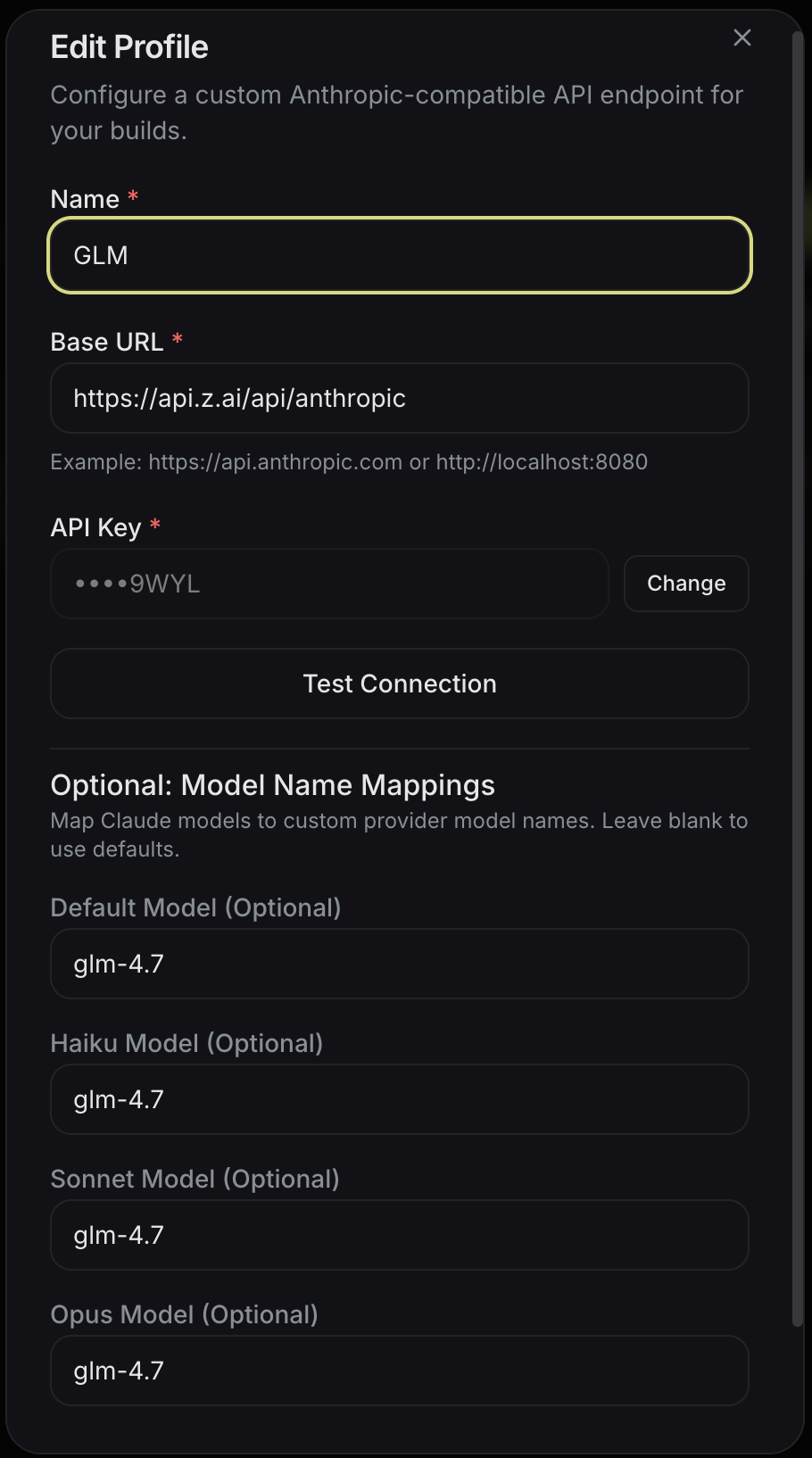
API Profile Setup
Make sure to:
- Set Profile Name
- Set Base URL (
https://api.z.ai/api/anthropic) - Set API Key
- etc, like image below.
Optimizing Performance: Pro & Max Plans
While Auto-Claude works great, you'll notice significant performance improvements with GLM 4.7's Pro or Max plans:
- Faster token processing - Reduces wait time between AI agent tasks
- Higher rate limits - Run more parallel agents simultaneously
- Better model quality - More accurate code generation and conflict resolution
- Priority processing - Your tasks get processed faster
If you haven't subscribed yet, you can use my referral link to get an additional 10% discount:
👉 Referral Link: https://z.ai/subscribe?ic=DZPPE8NO1H
This covers both GLM 4.7 Pro and Max plans. The discount stacks nicely with promotional pricing.
My Take: Why This Matters
When I first understood how Auto-Claude uses git worktrees to achieve parallel autonomous coding, I realized I was looking at the future of development tools.
This isn't just another AI coding assistant. It's a fundamentally new paradigm: autonomous AI agents that can work in parallel on complex codebases without stepping on each other's toes.
The beauty? It's built on proven Git technology. No magical black boxes. Just elegant architecture layered on top of tools we already trust.
Whether you're building microservices, managing multiple features simultaneously, or just want to see what autonomous AI development looks like—Auto-Claude with GLM 4.7 is worth exploring.
Give it a try. Fork the repo. Run the setup. Assign your first task. And watch your AI agents work.
You might be amazed at what's possible when safe isolation meets autonomous execution.
Final Thoughts
Auto-Claude represents more than just productivity gains. It's a demonstration of what's possible when you:
- Isolate work (git worktrees)
- Empower agents (autonomous AI)
- Validate automatically (built-in QA)
- Merge intelligently (AI conflict resolution)
Hope this deep dive was helpful. Whether you're a Git power user or new to worktrees, Auto-Claude is a great use case to explore these concepts practically.
Happy coding—or happy watching AI code! 🚀


Comments ()